from sideman import Live

live = Live()
live.get("live_set", "tempo")["value"], live.count("live_set", "tracks")["count"]
(122.0, 7)An audio track, a vocal phrase from the Core Library, warped to 122, and two chops landing off the beat in the breakdown. Audio is where the generic approach is tested hardest: everything about an audio clip is plain get/set except one thing, and that one thing is the reason clip_set_warp_markers exists.
Prerequisites: lesson 8 executed — seven tracks, 152 arrangement clips, seven locators, the breakdown at bars 80–96.
The ask: “Bring in a vocal sample, warp it to the tempo, and place two chops in the breakdown on the off-beats.”
from sideman import Live
live = Live()
live.get("live_set", "tempo")["value"], live.count("live_set", "tracks")["count"](122.0, 7)create_audio_track is its own function — the track type is decided at creation and cannot be changed afterwards. Name it before the sample lands on it, as before.
live.call("live_set", "create_audio_track", [-1])
live.set_batch([
    {"path": "live_set tracks 7", "property": "name", "value": "Vocal"},
    {"path": "live_set tracks 7", "property": "color_index", "value": 12},
])["applied"]2[i["name"] for i in
live.browser_list("packs/Core Library/Samples/Loops/Tonal/Vocal")["items"]][:8]['Beatbox Quasheesh.wav',
'Kyathe Monks.wav',
'L10 Demo Voc Reverb 1.aif',
'L10 Demo Voc Reverb 2.aif',
'L10 Demo Voc Reverse.aif',
'L10 Demo Voc.aif',
'Phrase Uh High 130 bpm.wav',
'Vocal Demo Harmony.aif']browser_load is the same call that put Drift on a MIDI track, but the destination rule is different: a device goes onto the track, a sample goes into the highlighted clip slot of the selected track, and only while Live is showing the Session view — from the Arrangement view the browser drops it nowhere and reports success anyway. track_index picks the track and nothing else, so on a Set with seven scenes the sample lands wherever the highlight happens to be — which, after lesson 7 built its clips in the second scene, is not slot 0.
Unlike selected_device, the highlight has a setter. Point it at the slot you mean, with the view and the selection to match.
live.call("live_app view", "show_view", ["Session"])
live.set("live_set view", "selected_track", {"__path__": "live_set tracks 7"})
live.set("live_set view", "highlighted_clip_slot",
         {"__path__": "live_set tracks 7 clip_slots 0"})
live.canonical_path("live_set view highlighted_clip_slot")["canonical_path"]
'live_set tracks 7 clip_slots 0'live.browser_load("packs/Core Library/Samples/Loops/Tonal/Vocal/"
"Vocal Patience Hum.wav", track_index=7){'loaded': 'packs/Core Library/Samples/Loops/Tonal/Vocal/Vocal Patience Hum.wav',
'track': 'Vocal'}VOC = "live_set tracks 7 clip_slots 0 clip"
{p: live.get(VOC, p)["value"] for p in
("name", "length", "warping", "warp_mode", "sample_length", "sample_rate",
"start_marker", "end_marker", "gain")}{'name': 'Vocal Patience Hum',
'length': 16.0,
'warping': True,
'warp_mode': 0,
'sample_length': 482875,
'sample_rate': 48000.0,
'start_marker': 0.0,
'end_marker': 16.0,
'gain': 0.4000000059604645}It arrived warped. Live reads the .asd file next to the sample, which is where its analysis lives, and the clip is already 16 beats long — four bars at whatever the Set’s tempo happens to be. That is what warping means: the clip’s length in beats is fixed and the playback rate follows the tempo.
The sample’s own tempo is arithmetic, not a property: sixteen beats spread over its real duration in seconds.
seconds = live.get(VOC, "sample_length")["value"] / live.get(VOC, "sample_rate")["value"]
beats = live.get(VOC, "length")["value"]
seconds, round(beats * 60 / seconds, 2)
(10.059895833333334, 95.43)95.4 BPM stretched to 122: a 28% speed-up, which a vocal will not survive in the default warp mode. Complex Pro is the one that handles voice.
live.set(VOC, "warp_mode", 6)
live.get(VOC, "warp_mode")["value"]6Read the warp markers as a property and you get this:
live.get(VOC, "warp_markers", limit=5)["value"]{'__vector__': True,
'count': 3,
'offset': 0,
'returned': 3,
'items': [{'__repr__': '<Clip.WarpMarker object at 0x160c40a50>',
'type': 'Clip.WarpMarker'},
{'__repr__': '<Clip.WarpMarker object at 0x160c40a50>',
'type': 'Clip.WarpMarker'},
{'__repr__': '<Clip.WarpMarker object at 0x160c40a50>',
'type': 'Clip.WarpMarker'}],
'truncated': False}Opaque. A WarpMarker is a C++ object with no JSON form, so the vector comes back as a list of repr strings. Individually they are navigable — a marker is a path like anything else — which is how you read the map:
n = live.count(VOC, "warp_markers")["count"]
[(live.get(f"{VOC} warp_markers {i}", "beat_time")["value"],
  round(live.get(f"{VOC} warp_markers {i}", "sample_time")["value"], 4))
 for i in range(n)]
[(0.0, 0.0), (16.0, 10.0599), (16.03125, 10.0795)]Reading works; writing does not. set(clip, "warp_markers", [...]) would have to build C++ objects out of JSON, and Live’s own move_marker wants a marker object you cannot construct from outside. So warp markers get one typed tool — warp_markers_set — which builds them inside Live from [beat_time, sample_time] pairs, where sample_time is in seconds, not frames.
Live’s own analysis has already put markers here — that is what the .asd file is. Writing them explicitly is how you correct a file whose analysis guessed wrong, and how you state a length rather than inherit one.
Two markers is a whole warp map: the start of the sample at beat 0, the end of it at beat 16. That is the statement “this file is exactly four bars long”, and everything else follows from the tempo.
live.warp_markers_set(VOC, [[0.0, 0.0], [16.0, seconds]]){'path': 'live_set tracks 7 clip_slots 0 clip',
'marker_count': 3,
'added': 2,
'removed': 0,
'remove_failed': 1,
'warping': True,
'marker_shape': 'kwargs'}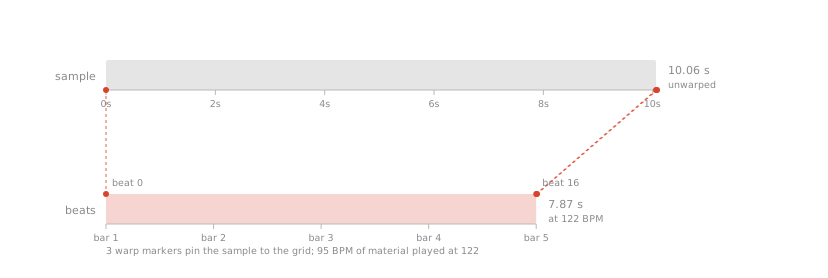
remove_failed: 1 is expected and documented: every clip carries one warp marker Live refuses to delete, and it shows up below at beat 16.03 — a 32nd past the end of the clip, where nothing plays. The two markers that matter are at the beats we asked for.
n = live.count(VOC, "warp_markers")["count"]
markers = [(live.get(f"{VOC} warp_markers {i}", "beat_time")["value"],
            round(live.get(f"{VOC} warp_markers {i}", "sample_time")["value"], 4))
           for i in range(n)]
markers, live.get(VOC, "warping")["value"], live.get(VOC, "length")["value"]
([(0.0, 0.0), (16.0, 10.0599), (16.03125, 10.0795)], True, 16.0)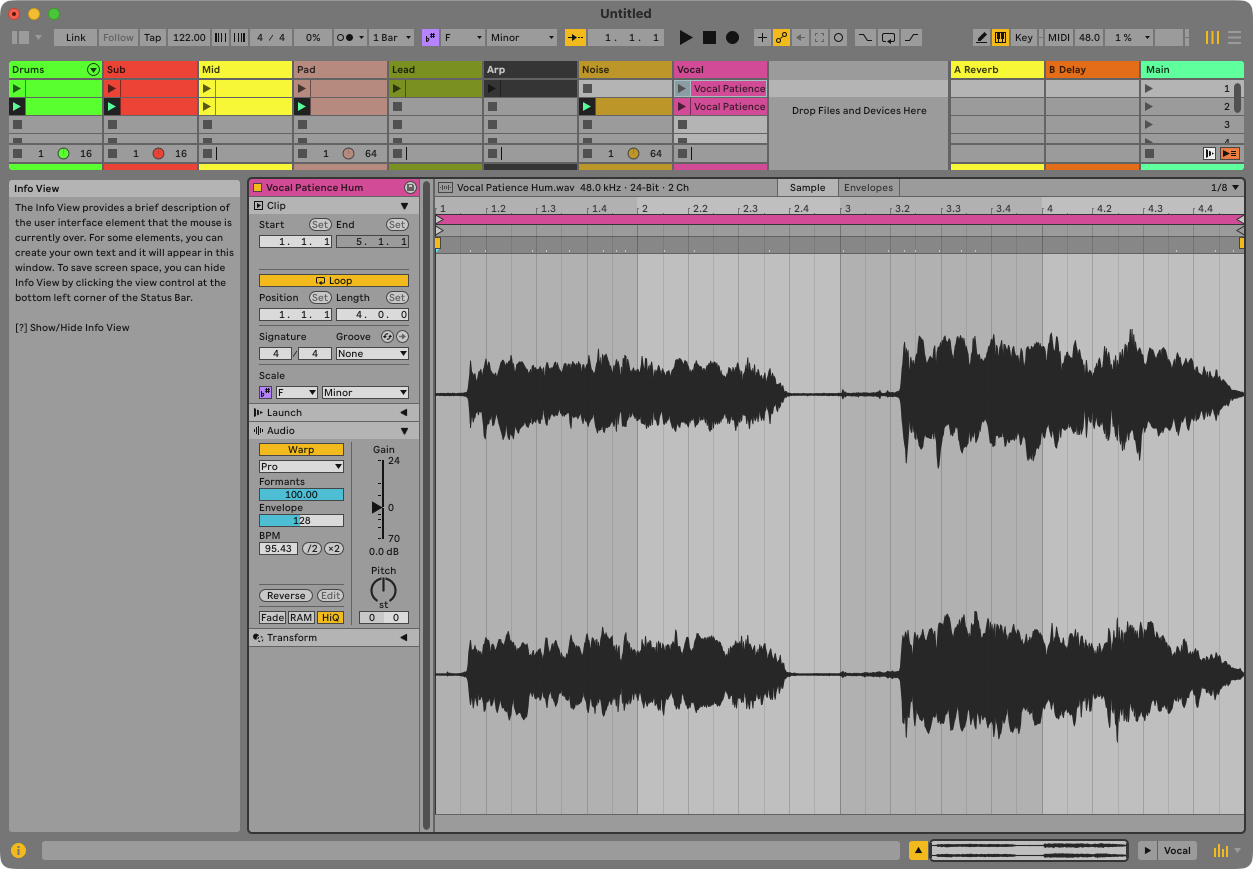
A chop is a clip whose markers cut a phrase out of the middle of the sample. Duplicate the clip into the next slot and move its four markers — start and end for playback, loop start and end so it repeats on the fragment rather than the whole file.
CHOP = "live_set tracks 7 clip_slots 1 clip"
live.call("live_set tracks 7 clip_slots 0", "duplicate_clip_to",
          [{"__path__": "live_set tracks 7 clip_slots 1"}])
live.set_batch([
    {"path": CHOP, "property": "start_marker", "value": 8.0},
    {"path": CHOP, "property": "end_marker", "value": 10.0},
    {"path": CHOP, "property": "loop_start", "value": 8.0},
    {"path": CHOP, "property": "loop_end", "value": 10.0},
])["applied"], live.get(CHOP, "length")["value"]
(4, 2.0)The breakdown runs bars 80–96, beats 320–384. The phrase enters at the top of it; the two chops answer on the off-beat — beat 338.5 and beat 354.5, half a beat late each time, which is what makes them sound like an answer rather than a repeat.
TRK = "live_set tracks 7"
live.arrangement_duplicate_clip(TRK, VOC, 320.0)     # the phrase, 4 bars
live.arrangement_duplicate_clip(TRK, CHOP, 338.5)    # chop, off the beat
live.arrangement_duplicate_clip(TRK, CHOP, 354.5)    # chop again, 4 bars later
live.arrangement_list(TRK)
{'path': 'live_set tracks 7',
'count': 3,
'clips': [{'index': 0,
'name': 'Vocal Patience Hum',
'start_time': 320.0,
'end_time': 336.0,
'is_midi': False},
{'index': 1,
'name': 'Vocal Patience Hum',
'start_time': 338.5,
'end_time': 340.5,
'is_midi': False},
{'index': 2,
'name': 'Vocal Patience Hum',
'start_time': 354.5,
'end_time': 356.5,
'is_midi': False}]}clip_set_warp_markers is one of four typed tools in the whole server, and it earns its place: the argument is a C++ object JSON cannot express, so the only honest interface is one that builds it inside Live. sample_time in seconds rather than frames is the part that costs an afternoon if you assume — the sample rate is right there in the clip, and multiplying by it produces a map that looks plausible and plays wrong.
Everything else on this track was plain property access: the markers, the gain, the warp mode, the loop points. One typed tool, and the generic path for the rest.
secs = round(live.get(VOC, "sample_length")["value"] /
             live.get(VOC, "sample_rate")["value"], 4)
markers = [(round(live.get(f"{VOC} warp_markers {i}", "beat_time")["value"], 4),
            round(live.get(f"{VOC} warp_markers {i}", "sample_time")["value"], 4))
           for i in range(live.count(VOC, "warp_markers")["count"])]
clips = live.arrangement_list(TRK)["clips"]

assert live.count("live_set", "tracks")["count"] == 8
assert live.get("live_set tracks 7", "name")["value"] == "Vocal"
assert live.get(VOC, "warping")["value"] is True
assert live.get(VOC, "warp_mode")["value"] == 6
assert (0.0, 0.0) in markers and (16.0, secs) in markers, markers
assert live.get(VOC, "length")["value"] == 16.0
assert live.get(CHOP, "length")["value"] == 2.0
assert [c["start_time"] for c in clips] == [320.0, 338.5, 354.5], clips
assert all(320.0 <= c["start_time"] and c["end_time"] <= 384.0 for c in clips), clips
assert live.get("live_set", "tempo")["value"] == 122.0, "the sample moved the tempo"
print("lesson 9 ok — Vocal at track 7, warped 95.4 -> 122, phrase + 2 chops in the breakdown")
lesson 9 ok — Vocal at track 7, warped 95.4 -> 122, phrase + 2 chops in the breakdown