from sideman import Live

live = Live()
LEAD = "live_set tracks 4"

def chain(track=LEAD):
    n = live.count(track, "devices")["count"]
    return [live.get(f"{track} devices {i}", "class_name")["value"] for i in range(n)]

chain()['Drift']An Audio Effect Rack on the Lead, a filter and a ping-pong delay in front of it, the Pad feeding the reverb return, and a third-party plug-in on the main track. Two of those four are where the Live API stops and a hand on the mouse takes over. This lesson is about knowing exactly where that line is, because a model that guesses here wastes your afternoon.
Prerequisites: lesson 5 executed — six tracks, Lead at 4, Arp at 5.
The ask: “Put an effect rack on the Lead with a filter and a ping-pong delay, expose cutoff and delay feedback as macros. Send the pad to the reverb return. Load Pro-Q on the main track and tell me what you can control.”
from sideman import Live
live = Live()
LEAD = "live_set tracks 4"
def chain(track=LEAD):
n = live.count(track, "devices")["count"]
return [live.get(f"{track} devices {i}", "class_name")["value"] for i in range(n)]
chain()['Drift']browser_load appends to the end of the track’s device chain. There is no argument for where: track.view.selected_device is read-only in the API, so the insertion point is not something a script can choose.
live.browser_load("audio_effects/Audio Effect Rack", track_index=4)
chain()
['Drift', 'AudioEffectGroupDevice']RACK = "live_set tracks 4 devices 1"
d = live.describe(RACK, include_values=False)
d["children"], [f for f in d["functions"] if "macro" in f]({'chains': 0, 'macros_mapped': 16, 'parameters': 18, 'return_chains': 0},
['add_has_macro_mappings_listener',
'add_macro',
'add_macros_mapped_listener',
'add_visible_macro_count_listener',
'has_macro_mappings_has_listener',
'macros_mapped_has_listener',
'randomize_macros',
'remove_has_macro_mappings_listener',
'remove_macro',
'remove_macros_mapped_listener',
'remove_visible_macro_count_listener',
'visible_macro_count_has_listener'])chains: 0 — the rack is empty. A rack with nothing in it is still a device with sixteen macro knobs, which is the part we can work with.
add_macro reveals the next macros. Watch the count: Live works in pairs.
before = live.get(RACK, "visible_macro_count")["value"]
live.call(RACK, "add_macro")
after_one = live.get(RACK, "visible_macro_count")["value"]
live.call(RACK, "add_macro")
before, after_one, live.get(RACK, "visible_macro_count")["value"]
(8, 10, 12)live.get(RACK, "macros_mapped", limit=16)["value"]["items"], \
live.get(RACK, "has_macro_mappings")["value"]([False,
False,
False,
False,
False,
False,
False,
False,
False,
False,
False,
False,
False,
False,
False,
False],
False)Sixteen macros, none mapped, and nothing in the Live Object Model maps one. The knobs are addressable — Macro 1 is a parameter you can read, write and automate — but the mapping from a macro to “Auto Filter’s cutoff” is made by dragging in Live’s GUI, and there is no function for it.
So the honest answer to “expose cutoff and delay feedback as macros” is: the rack and its macros are ready, the two parameters are ready, and the last step is yours — Map mode, two drags. A model that reports this as done is lying to you. macros_mapped is how you check: it is all False now, and it will show True for the ones you map.
live.browser_load("audio_effects/Auto Filter", track_index=4)
live.browser_load("audio_effects/Echo", track_index=4)
chain()
['Drift', 'AudioEffectGroupDevice', 'AutoFilter2', 'Echo']Both landed after the rack, because append is the only placement the API offers. Reordering, though, is a function — and its arguments are Live objects, not strings. A path passed as a bare string arrives inside Live as a str and the call fails on the C++ signature. {"__path__": ...} is resolved to the object before the call.
live.call("live_set", "move_device",
          [{"__path__": "live_set tracks 4 devices 2"},   # the Auto Filter
           {"__path__": LEAD}, 1])
chain()
['Drift', 'AutoFilter2', 'AudioEffectGroupDevice', 'Echo']live.call("live_set", "move_device",
[{"__path__": "live_set tracks 4 devices 3"}, # the Echo
{"__path__": LEAD}, 2])
chain()['Drift', 'AutoFilter2', 'Echo', 'AudioEffectGroupDevice']Drift, filter, delay, rack. And RACK is now wrong: it was devices 1 and the rack is at devices 3. A path is a position, not an identity — reorder anything and every path past the move point means something else. Re-resolve rather than trusting a variable from ten cells ago.
RACK = "live_set tracks 4 devices " + str(chain().index("AudioEffectGroupDevice"))
RACK, live.get(RACK, "class_name")["value"]
('live_set tracks 4 devices 3', 'AudioEffectGroupDevice')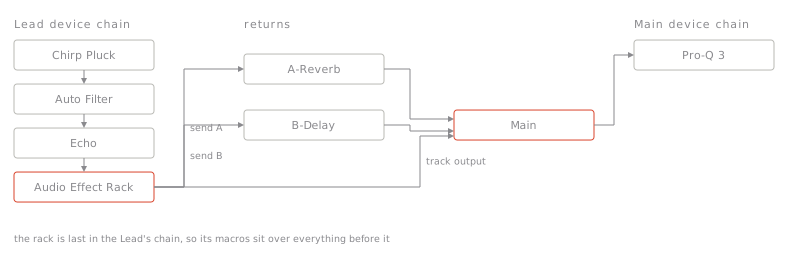
Echo’s stereo behaviour is one quantized parameter. A quantized parameter’s value is an index into its own list of names — so read the list rather than guessing that 1 means ping-pong.
hits = live.search(query="Channel Mode", root=LEAD, type="DeviceParameter")
CM = hits["results"][0]["path"]
modes = live.get(CM, "value_items")["value"]
CM, live.get(CM, "is_quantized")["value"], modes
('live_set tracks 4 devices 2 parameters 18',
True,
['Stereo', 'Ping Pong', 'Mid/Side'])live.set(CM, "value", 1)
modes[int(live.get(CM, "value")["value"])]'Ping Pong'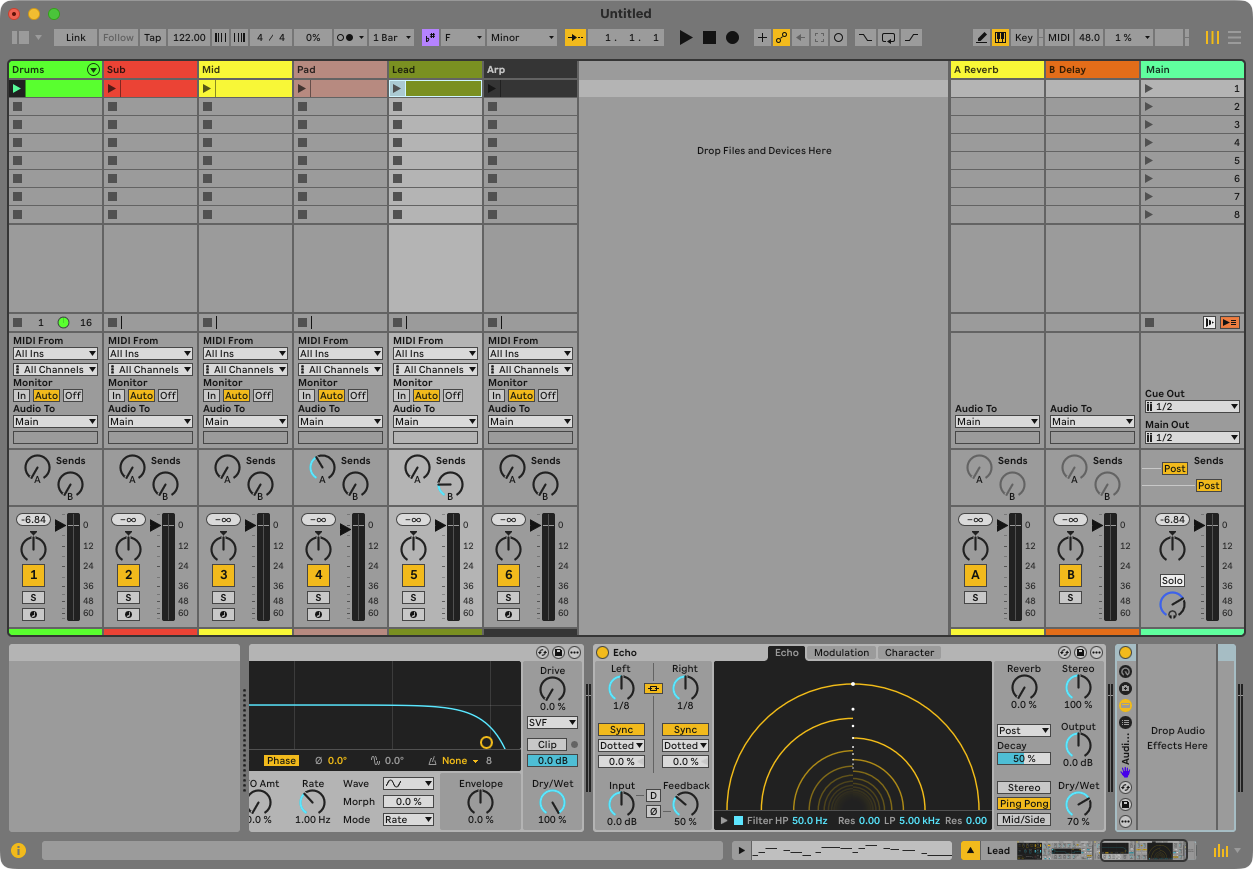
A send is a mixer parameter, normalised 0–1, named after the return it feeds. The Pad goes to the reverb; the Lead gets a little of the delay return on top of its own Echo.
[live.get(f"live_set tracks 4 mixer_device sends {i}", "name")["value"] for i in (0, 1)]['A-Reverb', 'B-Delay']live.set_batch([
{"path": "live_set tracks 3 mixer_device sends 0", "property": "value", "value": 0.40},
{"path": "live_set tracks 4 mixer_device sends 1", "property": "value", "value": 0.20},
])["applied"]2browser_load(track_index=…) cannot reach it — the main track is not in tracks. It is live_set master_track, and loading onto it means selecting it first. Selecting takes a Live object, so it takes a __path__ marker too.
live.set("live_set view", "selected_track", {"__path__": "live_set master_track"})
live.canonical_path("live_set view selected_track")
{'path': 'live_set view selected_track',
'type': 'Track.Track',
'canonical_path': 'live_set master_track',
'is_alias': True,
'nodes_visited': 18}live.browser_load("plugins/AUv2/FabFilter/Pro-Q 3")
live.count("live_set master_track", "devices"), \
live.get("live_set master_track devices 0", "name")["value"]({'path': 'live_set master_track', 'child': 'devices', 'count': 1}, 'Pro-Q 3')Here is the whole problem with third-party plug-ins, in two cells. Live exposes exactly one parameter for an AU or VST until the user opens the plug-in’s title bar and presses Configure, then picks which controls to publish. That is a GUI-only step with no API behind it.
PLUG = "live_set master_track devices 0"
live.get(PLUG, "parameters", limit=5)["value"]
{'__vector__': True,
'count': 1,
'offset': 0,
'returned': 1,
'items': [{'__lom__': 'DeviceParameter.DeviceParameter',
'name': 'Device On'}],
'truncated': False}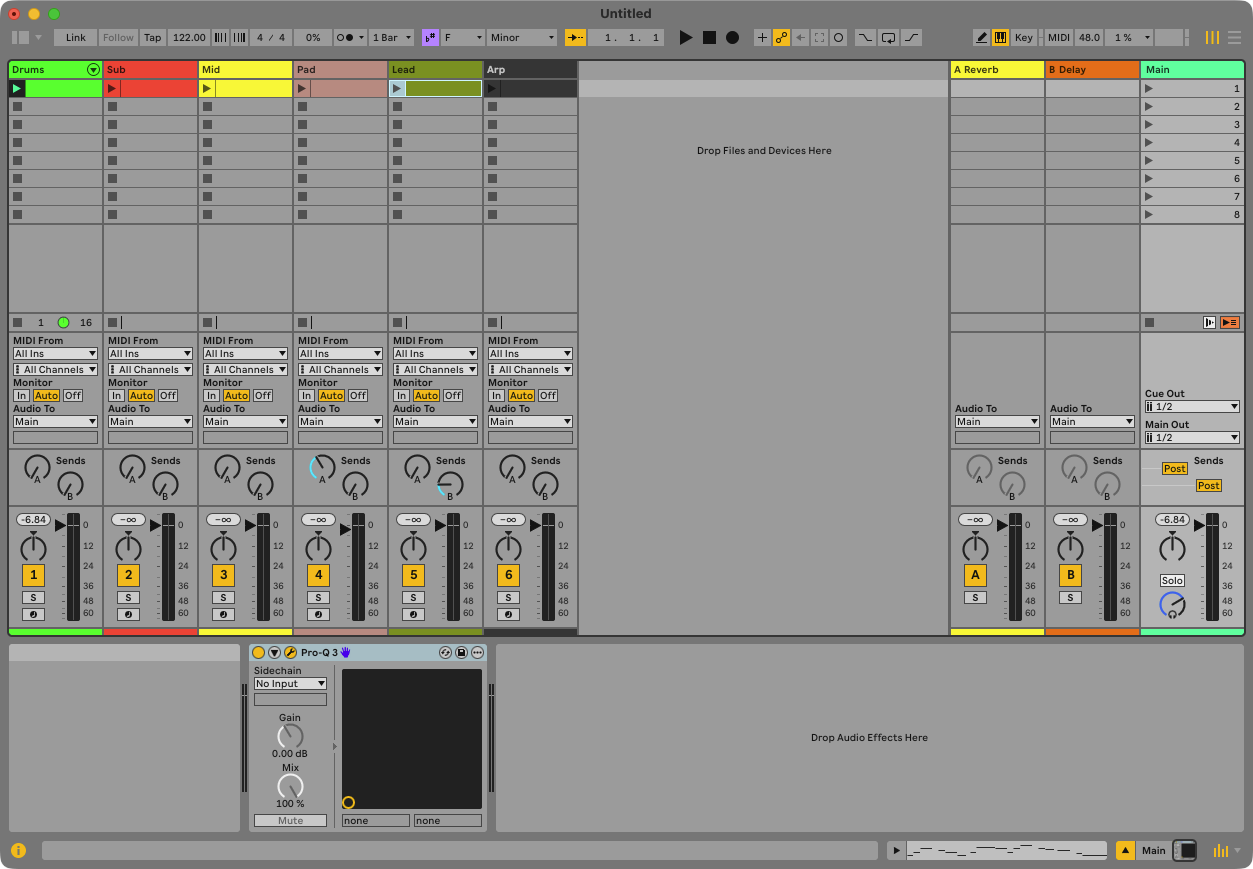
One parameter: Device On. Nothing else is automatable, mappable or readable as a value — yet.
What Live will tell you is the plug-in’s full parameter list, by name. Long return values page with offset/limit rather than arriving as one wall of text, so this is a readable call even on a plug-in with hundreds of controls.
r = live.call(PLUG, "get_parameter_names", limit=12)["result"]
r["count"], r["items"]
(358,
['Band 1 Used',
'Band 1 Enabled',
'Band 1 Frequency',
'Band 1 Gain',
'Band 1 Dynamic Range',
'Band 1 Dynamics Enabled',
'Band 1 Threshold',
'Band 1 Q',
'Band 1 Shape',
'Band 1 Slope',
'Band 1 Stereo Placement',
'Band 1 Speakers'])tail = live.call(PLUG, "get_parameter_names", offset=r["count"] - 6, limit=6)["result"]
tail["offset"], tail["items"](352,
['Band 19 External Side Chain',
'Band 20 External Side Chain',
'Band 21 External Side Chain',
'Band 22 External Side Chain',
'Band 23 External Side Chain',
'Band 24 External Side Chain'])So Claude can tell you precisely which controls to expose — “press Configure and publish Band 3 Frequency and Output Gain” — and it cannot press the button. The useful behaviour is to say so.
Three walls in one lesson, all of them real: a device cannot be placed inside a rack, a macro cannot be mapped, and a plug-in’s parameters cannot be published. Everything else here was one property write. The difference is not arbitrary — these are the places Live’s own API stops, and a generic server cannot invent what is not exposed. It can tell you where the edge is, which is worth more than a wrapper that pretends there is none.
Arguments that are Live objects go in {"__path__": "..."} markers. A plain string is never reinterpreted as a path, so ordinary string arguments stay safe. Long vectors page with offset/limit — parameters, chains, a plug-in’s parameter names.
assert chain() == ["Drift", "AutoFilter2", "Echo", "AudioEffectGroupDevice"], chain()
assert live.count("live_set master_track", "devices")["count"] == 1
assert live.get(PLUG, "parameters", limit=5)["value"]["count"] == 1, "Configure was pressed"
assert live.get(RACK, "class_name")["value"] == "AudioEffectGroupDevice"
assert live.get(RACK, "has_macro_mappings")["value"] is False
assert round(live.get("live_set tracks 3 mixer_device sends 0", "value")["value"], 2) == 0.4
print("lesson 6 ok — Lead chain of 4, Pro-Q on the main track with 1 parameter")
lesson 6 ok — Lead chain of 4, Pro-Q on the main track with 1 parameter