from sideman import Live

live = Live()
TRACKS = {i: live.get(f"live_set tracks {i}", "name")["value"] for i in range(7)}
TRACKS
{0: 'Drums', 1: 'Sub', 2: 'Mid', 3: 'Pad', 4: 'Lead', 5: 'Arp', 6: 'Noise'}Seven sections, 168 bars, one pass: 32-bar intro on drums and sub, a 16-bar build, a 32-bar drop with everything, a 16-bar breakdown, the build again, the drop again, a 24-bar outro. Everything needed already exists as Session clips; this lesson is about where they go and what the arrangement will and will not let you do to them.
Prerequisites: lesson 7 executed — seven tracks, four-bar loops in clip_slots 0, build clips in clip_slots 1.
The ask: “Lay this out as a track: intro 32 bars with drums and sub only, build 16, drop 32 with everything, breakdown 16 with pad and lead, build 16, drop 32, outro 24. Put a locator at each section.”
from sideman import Live
live = Live()
TRACKS = {i: live.get(f"live_set tracks {i}", "name")["value"] for i in range(7)}
TRACKS{0: 'Drums', 1: 'Sub', 2: 'Mid', 3: 'Pad', 4: 'Lead', 5: 'Arp', 6: 'Noise'}Bars are the unit a musician thinks in; the API counts beats. In 4/4 that is one multiplication, and it is the only place a bar number appears — keeping the conversion in one function is how the arrangement stays readable.
BEATS_PER_BAR = live.get("live_set", "signature_numerator")["value"]

sections = [("Intro",     0,   32),
            ("Build 1",   32,  16),
            ("Drop 1",    48,  32),
            ("Breakdown", 80,  16),
            ("Build 2",   96,  16),
            ("Drop 2",    112, 32),
            ("Outro",     144, 24)]

# section -> {track index: which clip slot plays there}
layout = {"Intro":     {0: 0, 1: 0},
          "Build 1":   {0: 1, 1: 1, 3: 1, 6: 1},
          "Drop 1":    {0: 0, 1: 0, 2: 0, 3: 0, 4: 0, 5: 0},
          "Breakdown": {3: 0, 4: 0},
          "Build 2":   {0: 1, 1: 1, 3: 1, 6: 1},
          "Drop 2":    {0: 0, 1: 0, 2: 0, 3: 0, 4: 0, 5: 0},
          "Outro":     {0: 0, 3: 0}}

[(n, bar * BEATS_PER_BAR, length * BEATS_PER_BAR) for n, bar, length in sections]
[('Intro', 0, 128),
('Build 1', 128, 64),
('Drop 1', 192, 128),
('Breakdown', 320, 64),
('Build 2', 384, 64),
('Drop 2', 448, 128),
('Outro', 576, 96)]A four-bar loop tiles eight times across a 32-bar section; the 16-bar build clips tile once. Read the lengths rather than remembering them.
slots = sorted({(t, s) for sec in layout.values() for t, s in sec.items()})
lengths = {}
for r in live.get_batch([{"path": f"live_set tracks {t} clip_slots {s} clip",
                          "property": "length"} for t, s in slots])["results"]:
    lengths[r["path"]] = r["value"]
{f"{TRACKS[t]} slot {s}": lengths[f"live_set tracks {t} clip_slots {s} clip"]
 for t, s in slots}
{'Drums slot 0': 16.0,
'Drums slot 1': 16.0,
'Sub slot 0': 16.0,
'Sub slot 1': 16.0,
'Mid slot 0': 16.0,
'Pad slot 0': 16.0,
'Pad slot 1': 64.0,
'Lead slot 0': 16.0,
'Arp slot 0': 16.0,
'Noise slot 1': 64.0}arrangement_duplicate_clip copies a Session clip to a position in the Arrangement. One call per tile — 152 of them for this arrangement, which is a loop, not typing.
placed = 0
for name, bar, bars in sections:
    start, span = bar * BEATS_PER_BAR, bars * BEATS_PER_BAR
    for track, slot in sorted(layout[name].items()):
        src = f"live_set tracks {track} clip_slots {slot} clip"
        step = lengths[src]
        for offset in range(0, int(span), int(step)):
            live.arrangement_duplicate_clip(f"live_set tracks {track}", src,
                                            start + offset)
            placed += 1
placed152{TRACKS[t]: live.arrangement_list(f"live_set tracks {t}")["count"] for t in range(7)}{'Drums': 38,
'Sub': 32,
'Mid': 16,
'Pad': 28,
'Lead': 20,
'Arp': 16,
'Noise': 2}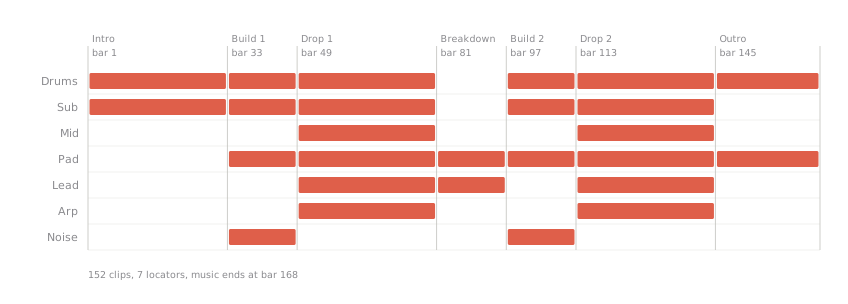
The obvious alternative is one clip per section, stretched. Try it on the first arrangement clip: the content markers move, and the clip’s footprint in the arrangement does not.
first = "live_set tracks 0 arrangement_clips 0"
before = (live.get(first, "end_marker")["value"], live.get(first, "end_time")["value"])
live.set(first, "end_marker", 32.0)
live.set(first, "loop_end", 32.0)
before, (live.get(first, "end_marker")["value"], live.get(first, "end_time")["value"])
((16.0, 16.0), (32.0, 16.0))try:
live.set(first, "end_time", 32.0)
except Exception as e:
print(type(e).__name__, e)LiveError AttributeError: property of 'Clip' object has no setterend_marker went to 32 and end_time stayed at 16 — the clip still stops where it stopped. end_time is the property that would have to move and it has no setter: resizing a looped clip in the Arrangement is a drag in Live’s GUI, not an API call. Tiling is not a workaround, it is the operation that exists.
Put that clip back the way it was.
live.set(first, "loop_end", 16.0)
live.set(first, "end_marker", 16.0)
live.get(first, "end_marker")["value"], live.get(first, "end_time")["value"]
(16.0, 16.0)There is no create_cue(time, name). A locator goes where the playhead is: move current_song_time, then call set_or_delete_cue — which toggles, so calling it twice at one position leaves nothing behind.
for name, bar, _ in sections:
    live.set("live_set", "current_song_time", bar * BEATS_PER_BAR)
    live.call("live_set", "set_or_delete_cue")

live.count("live_set", "cue_points")
{'path': 'live_set', 'child': 'cue_points', 'count': 7}times = {live.get(f"live_set cue_points {i}", "time")["value"]: i
for i in range(live.count("live_set", "cue_points")["count"])}
live.set_batch([{"path": f"live_set cue_points {times[bar * BEATS_PER_BAR]}",
"property": "name", "value": name}
for name, bar, _ in sections])["applied"]7[(live.get(f"live_set cue_points {i}", "name")["value"],
live.get(f"live_set cue_points {i}", "time")["value"])
for i in range(live.count("live_set", "cue_points")["count"])][('Intro', 0.0),
('Build 1', 128.0),
('Drop 1', 192.0),
('Breakdown', 320.0),
('Build 2', 384.0),
('Drop 2', 448.0),
('Outro', 576.0)]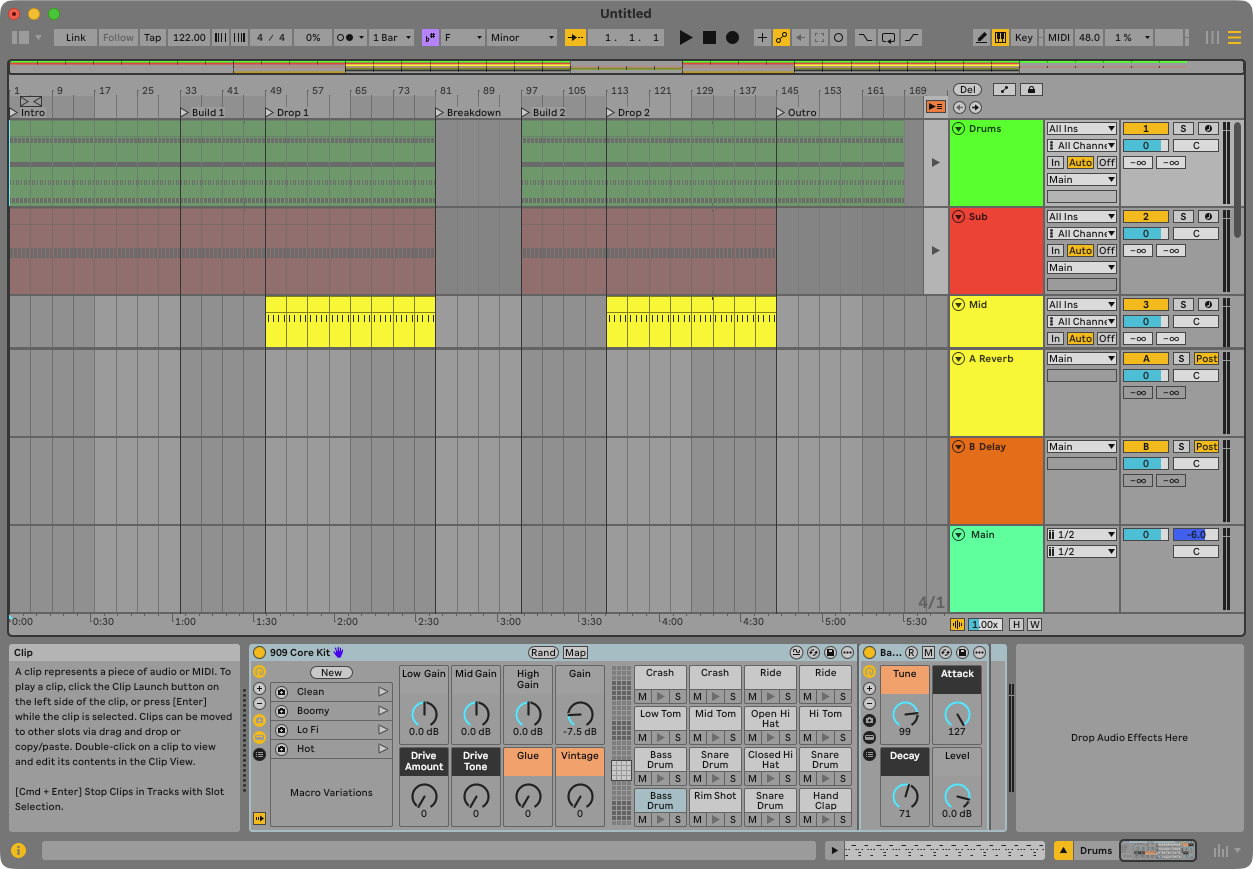
Every section boundary should be covered by drums except the breakdown, which is the one place the track opens up — so check for gaps rather than trusting the loop above. song_length is worth reading first, and worth reading carefully.
live.set("live_set", "current_song_time", 0.0)
last_clip_end = max(c["end_time"]
                    for t in range(7)
                    for c in live.arrangement_list(f"live_set tracks {t}")["clips"])
live.get("live_set", "song_length")["value"], last_clip_end
(704.0, 672.0)clips = sorted((c["start_time"], c["end_time"])
for c in live.arrangement_list("live_set tracks 0")["clips"])
gaps, cursor = [], 0.0
for s, e in clips:
if s > cursor:
gaps.append((cursor / BEATS_PER_BAR, s / BEATS_PER_BAR))
cursor = max(cursor, e)
[(f"bars {a:.0f}-{b:.0f}") for a, b in gaps]['bars 80-96']The music ends at beat 672 — bar 168 — and song_length says 704. Live pads the arrangement with eight bars of nothing past the last clip, so song_length is the length of the timeline, not of the track. Measure the music from the clips.
One gap in the drums, bars 80 to 96: the breakdown. Everything else is continuous from bar 1 to bar 168.
A looped arrangement clip cannot be lengthened in place, because the property that defines its end in the timeline is read-only. Tiling is the honest operation, and it is also what a producer does by hand.
Bar positions here assume one time signature all the way through. Live’s API exposes signature_numerator and signature_denominator as single values — there is no list of meter changes to read — so a Set with a 7/8 bridge cannot be laid out by this arithmetic, and nothing in the API will warn you.
counts = {TRACKS[t]: live.arrangement_list(f"live_set tracks {t}")["count"]
          for t in range(7)}
assert counts == {"Drums": 38, "Sub": 32, "Mid": 16, "Pad": 28,
                  "Lead": 20, "Arp": 16, "Noise": 2}, counts
assert live.count("live_set", "cue_points")["count"] == 7
assert [live.get(f"live_set cue_points {i}", "time")["value"] for i in range(7)] == \
       [0.0, 128.0, 192.0, 320.0, 384.0, 448.0, 576.0]
assert last_clip_end == 168 * BEATS_PER_BAR, last_clip_end
assert live.get("live_set", "song_length")["value"] >= last_clip_end
assert gaps == [(80.0, 96.0)], gaps
print("lesson 8 ok — 152 clips, 7 locators, music ends at bar 168 ≈ 5:30 at 122 BPM")
lesson 8 ok — 152 clips, 7 locators, music ends at bar 168 ≈ 5:30 at 122 BPM