from sideman import Live

live = Live()
live.get("live_set", "scale_intervals")["value"]
[0, 2, 3, 5, 7, 8, 10]A plucked Lead playing a two-bar call and a two-bar answer over the chords, with one note from outside the scale, and an Arp track running each chord as rising 16ths. This is the lesson where the track gets something you can hum.
Prerequisites: lesson 4 executed — Drums, Sub, Mid, Pad at tracks 0–3.
The ask: “Write a plucky lead melody over the chords — a two-bar call and a two-bar answer, mostly scale tones, one blue note. Then an arp track that runs each chord as rising 16ths. Humanise the arp velocities.”
from sideman import Live
live = Live()
live.get("live_set", "scale_intervals")["value"][0, 2, 3, 5, 7, 8, 10]Lesson 1 set the key; read it back rather than hardcoding F minor. The Set knows its own root and intervals, so the melody can be derived from them — which is what makes this a lesson rather than a transcription.
root = live.get("live_set", "root_note")["value"]          # 5 = F
intervals = live.get("live_set", "scale_intervals")["value"]

scale = sorted(root + 12 * octave + i
               for octave in range(3, 6) for i in intervals)
[p for p in scale if 60 <= p <= 79]
[60, 61, 63, 65, 67, 68, 70, 72, 73, 75]Those are the F minor scale tones from C4 up. The lead lives in the top half of that: high enough to sit over the pad, low enough not to whistle.
Same shape as before: make them, name them before any preset lands on them, then load.
for _ in range(2):
    live.call("live_set", "create_midi_track", [-1])

live.set_batch([
    {"path": "live_set tracks 4", "property": "name", "value": "Lead"},
    {"path": "live_set tracks 4", "property": "color_index", "value": 60},
    {"path": "live_set tracks 5", "property": "name", "value": "Arp"},
    {"path": "live_set tracks 5", "property": "color_index", "value": 69},
])["applied"]4live.browser_load("instruments/Drift/Guitar & Plucked/Chirp Pluck.adv", track_index=4)
live.browser_load("instruments/Drift/Synth Rhythmic/Echo Pulse.adv", track_index=5){'loaded': 'instruments/Drift/Synth Rhythmic/Echo Pulse.adv', 'track': 'Arp'}Bars 1–2 ask, bars 3–4 answer. The call climbs to C5 and settles on Ab4 over Fm7 and Db; the answer goes higher — Eb5 is the top of the phrase — and comes back down to F4, the tonic, on the last bar.
One note is not in the scale: B4 (71), between Bb4 and C5. In F minor the scale has Bb, not B; borrowing the note a semitone up and falling straight back to Bb is the blue note. One is a colour. Two is a different key.
def note(pitch, start, dur, vel):
    return {"pitch": pitch, "start_time": start, "duration": dur, "velocity": vel}

call = [note(65, 0.0, 0.50, 96),    # F4
        note(68, 0.5, 0.50, 88),    # Ab4
        note(72, 1.0, 1.00, 100),   # C5
        note(70, 2.5, 0.50, 84),    # Bb4
        note(68, 3.0, 1.00, 92),    # Ab4
        note(65, 4.0, 0.75, 90),    # F4   — over Db
        note(68, 5.0, 0.50, 86),    # Ab4
        note(73, 5.5, 1.50, 98),    # Db5
        note(70, 6.0, 0.50, 80),    # Bb4  — thinned out below
        note(72, 6.5, 0.25, 76),    # C5   — thinned out below
        note(72, 7.0, 1.00, 88)]    # C5

answer = [note(68, 8.0, 0.50, 94),   # Ab4  — over Ab
          note(72, 8.5, 0.50, 90),   # C5
          note(75, 9.0, 1.00, 102),  # Eb5  — top of the phrase
          note(72, 10.5, 0.50, 86),  # C5
          note(71, 11.0, 0.75, 90),  # B4   — the blue note
          note(70, 12.0, 1.00, 92),  # Bb4  — over Eb
          note(67, 13.5, 0.50, 84),  # G4
          note(65, 14.0, 2.00, 88)]  # F4   — home

LEAD = "live_set tracks 4 clip_slots 0 clip"
live.call("live_set tracks 4 clip_slots 0", "create_clip", [16.0])
live.notes_add(LEAD, call + answer)
{'path': 'live_set tracks 4 clip_slots 0 clip', 'added': 19}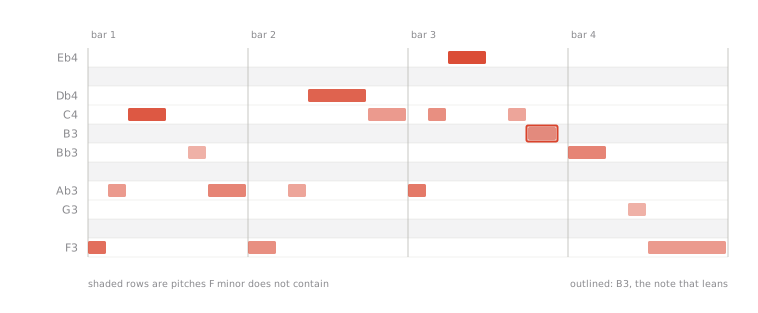
Nineteen notes is two too many: bar 2 is crowded where the Db5 is still ringing. remove_notes takes a pitch and time window, not a list of ids, so “everything in the second half of bar 2” is one call. The defaults remove everything in the clip — always pass a window.
live.notes_remove(LEAD, from_time=6.0, time_span=0.75){'path': 'live_set tracks 4 clip_slots 0 clip', 'removed': 2}g = live.notes_get(LEAD)
g["count"], sorted((n["start_time"], n["pitch"]) for n in g["notes"])[:8](17,
[(0.0, 65),
(0.5, 68),
(1.0, 72),
(2.5, 70),
(3.0, 68),
(4.0, 65),
(5.0, 68),
(5.5, 73)])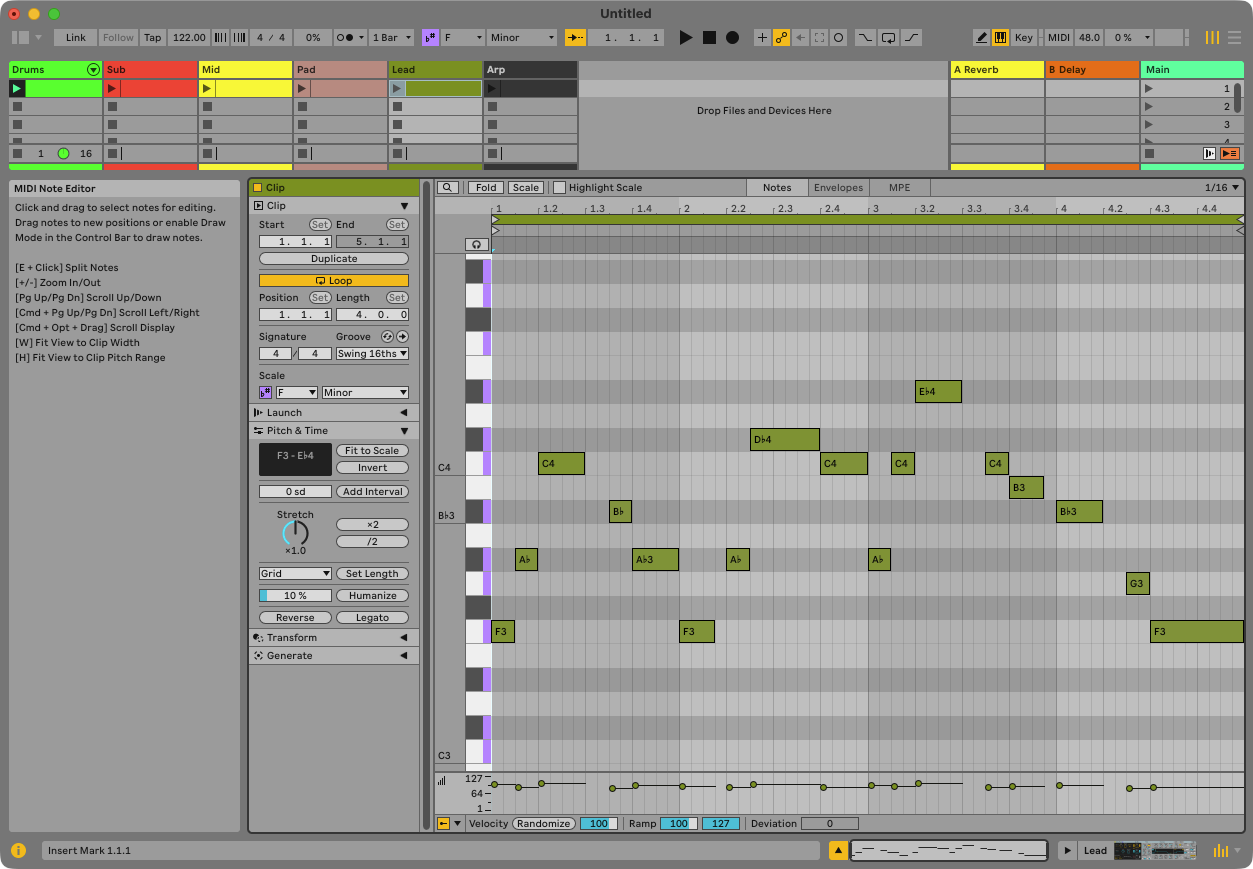
Sorted on the way out, because notes_get returns notes grouped by pitch rather than in time order. Nothing guarantees an order Live did not promise.
Each bar’s chord, straight up: the pad’s four voices, then the same four an octave higher, as 16ths. Eight tones fills half a bar, so the run happens twice per chord — 16 notes a bar, 64 over the phrase.
Humanising is not randomness for its own sake. The accent falls on the beat and the rest sit back, with a small deterministic wobble so no two 16ths are identical. Seeded, because a lesson whose output changes every run is not checkable.
import random

random.seed(122)
chords = [[53, 56, 60, 63],    # Fm7
          [53, 56, 61, 65],    # Db
          [51, 56, 60, 63],    # Ab
          [51, 55, 58, 63]]    # Eb

arp = []
for b, pitches in enumerate(chords):
    tones = pitches + [p + 12 for p in pitches]
    for i in range(16):
        vel = (104 if i % 4 == 0 else 78) + random.randint(-6, 6)
        arp.append(note(tones[i % 8], b * 4 + i * 0.25, 0.22, vel))

ARP = "live_set tracks 5 clip_slots 0 clip"
live.call("live_set tracks 5 clip_slots 0", "create_clip", [16.0])
live.notes_add(ARP, arp)
{'path': 'live_set tracks 5 clip_slots 0 clip', 'added': 64}first_bar = sorted(live.notes_get(ARP, time_span=4.0)["notes"],
key=lambda n: n["start_time"])
live.notes_get(ARP)["count"], [(n["pitch"], int(n["velocity"])) for n in first_bar[:8]](64,
[(53, 106),
(56, 75),
(60, 81),
(63, 76),
(65, 99),
(68, 83),
(72, 77),
(75, 84)])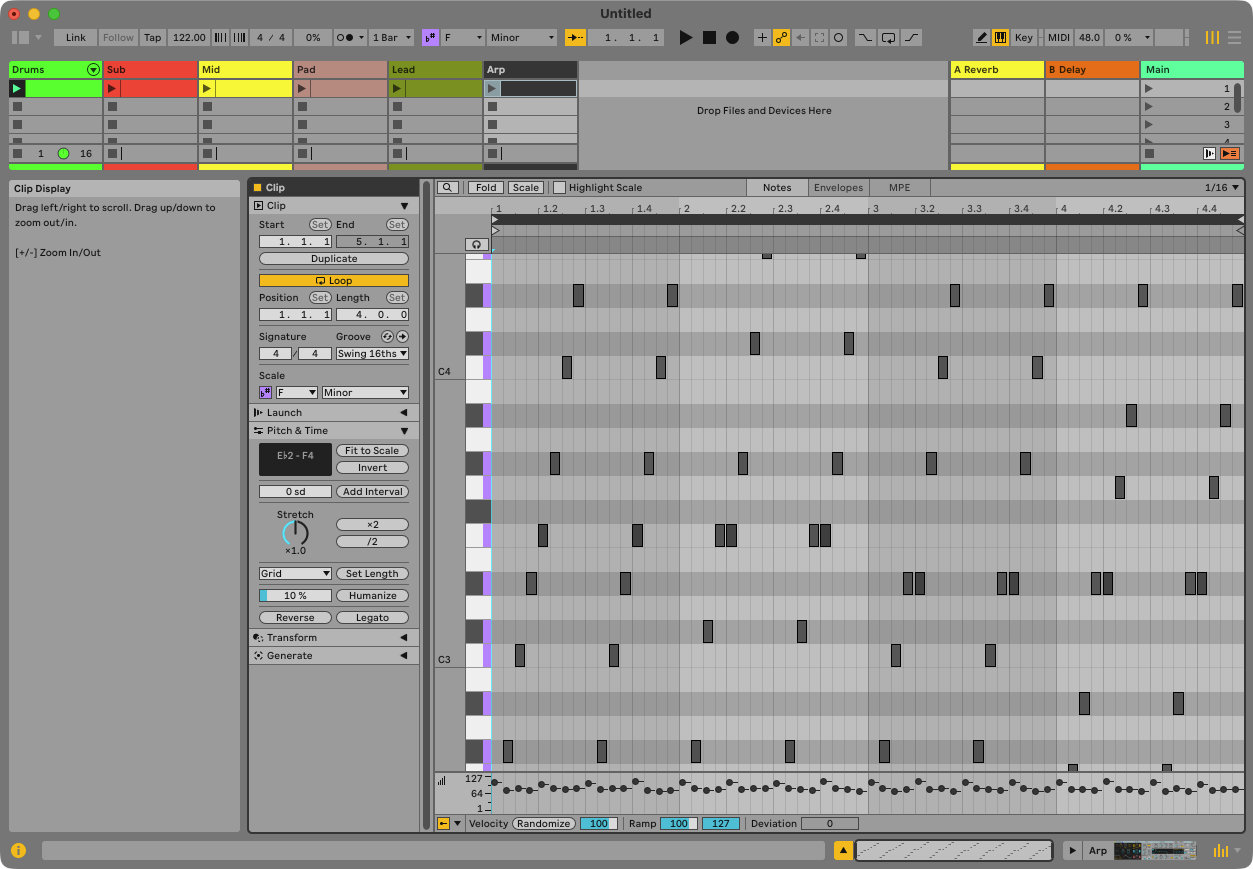
Before deciding what the mix needs, look at all of it. get_batch sends N reads down one connection and — this is the point — each result carries its own ok. The last spec below asks a MIDI track for an input meter it does not have; the other reads come back regardless.
specs = [{"path": f"live_set tracks {i}", "property": p}
         for i in range(6) for p in ("name", "color_index")]
specs += [{"path": f"live_set tracks {i} clip_slots 0 clip", "property": "length"}
          for i in range(6)]
specs += [{"path": "live_set tracks 0", "property": "input_meter_left"}]

batch = live.get_batch(specs)
batch["count"], batch["ok_count"]
(19, 18)names = [r["value"] for r in batch["results"] if r["ok"] and r["property"] == "name"]
lengths = [r["value"] for r in batch["results"] if r["ok"] and r["property"] == "length"]
[(r["property"], r["error"]) for r in batch["results"] if not r["ok"]][('input_meter_left',
"RuntimeError: 'input_meter_left' unavailable on this Track.Track: MIDI tracks have no 'input_meter_left' property!")]names, lengths(['Drums', 'Sub', 'Mid', 'Pad', 'Lead', 'Arp'],
[16.0, 16.0, 16.0, 16.0, 16.0, 16.0])get_batch isolates failures. One unavailable property returns its own error next to five successful reads instead of taking them down with it — which matters most when you are reading a Set you did not build and do not yet know what is on it. set_batch is the opposite by default: it stops on the first error, because a half-applied mix is worse than a refused one.
The melody came from scale_intervals, not from a constant in the code. Ask the Set what key it is in and the same cell works when the user changes their mind.
assert live.count("live_set", "tracks")["count"] == 6
assert [live.get(f"live_set tracks {i}", "name")["value"] for i in (4, 5)] == ["Lead", "Arp"]
assert live.notes_get(ARP)["count"] == 64
assert live.notes_get(LEAD)["count"] == 17
assert 71 in [n["pitch"] for n in live.notes_get(LEAD)["notes"]], "the blue note is gone"
print("lesson 5 ok — Lead 17 notes with the B4, Arp 64 notes over 4 bars")
lesson 5 ok — Lead 17 notes with the B4, Arp 64 notes over 4 bars