Sideman Sideman Course

A free course · ten lessons

One track, start to finish.
Claude does the work in your Set.

122 BPM, F minor, five and a half minutes — intro, build, drop, breakdown, second drop, outro. Ten lessons, one Ableton Live Set, and Claude building it through Sideman while you watch.

BPM
122
Key
F minor
Length
5:30
Lessons
10
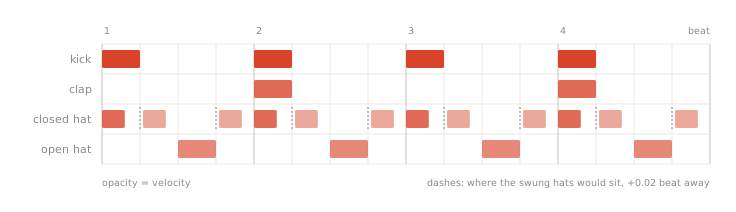
you Make a Drums track with a 909 kit — kick on every beat, claps on 2 and 4
122.00 BPM · F minor · 5:30 Sideman · every Live edition

Two ways to read it

Two paths through one track

Same track, same ten lessons. One path shows you the moves in Live; the other shows you the calls behind them.

Path 1

no code

Make a track with Claude

For musicians. You type what you want; the page tells you what Claude does, what you'll see in Live, and how to check it. No code.

  • Say — the prompt, as you'd type it
  • What Claude does — the moves in Live, in plain terms
  • What you'll see in Live — where to look
  • Check — one question, and the answer that means it landed
Start Path 1

Path 2

python · jupyter

Under the hood

For programmers and the curious. The same ten lessons as executed Jupyter notebooks driving the Python client — every cell's output frozen from a real Set.

  • Read them as written, cell by cell
  • Or run them yourself against your own Live
  • Nothing illustrative — every output is real
  • The last cell of each notebook checks the state it built
Start Path 2

Every lesson's outcome and checkpoint, both paths: the syllabus. Or read the book from its own front page: course/.

What you'll build

One Set, built in order

Every number and picture on the course pages came from a real run: the notebooks were executed against a fresh Set and their outputs frozen. These are that Set.

Drum grid showing kick on every beat, clap on 2 and 4, closed hats on 16ths with alternating velocity, open hats off-beat
Lesson 2 — the drum groove, one bar
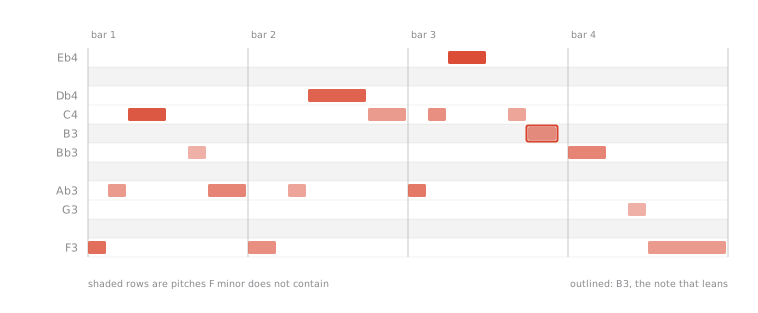
Piano roll of a plucked lead line over four bars in F minor, with one note outside the scale marked as the blue note
Lesson 5 — the lead line, four bars
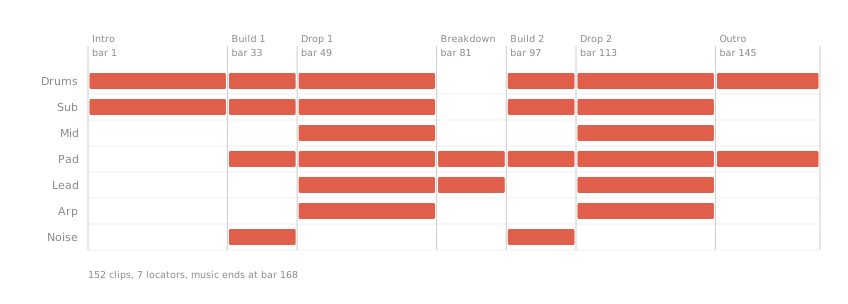
Timeline of the full arrangement: intro, build, drop, breakdown, second build, second drop, outro across eight tracks
Lesson 8 — the full arrangement
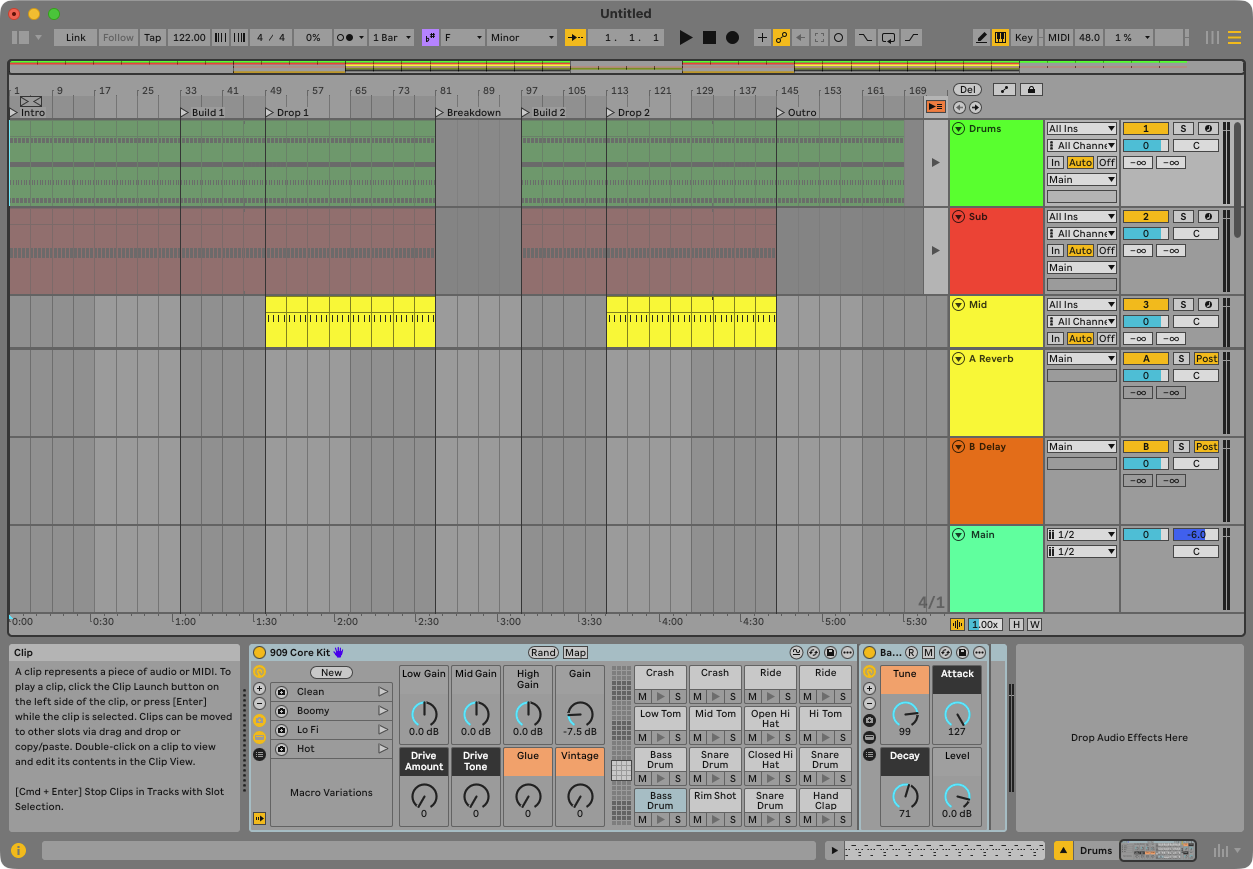
Ableton Live Arrangement view after lesson 8, showing seven sections of clips across drums, bass, pad, lead, arp, noise, and vocal tracks
The Arrangement of the finished Set — 155 clips across seven sections, built one lesson at a time.
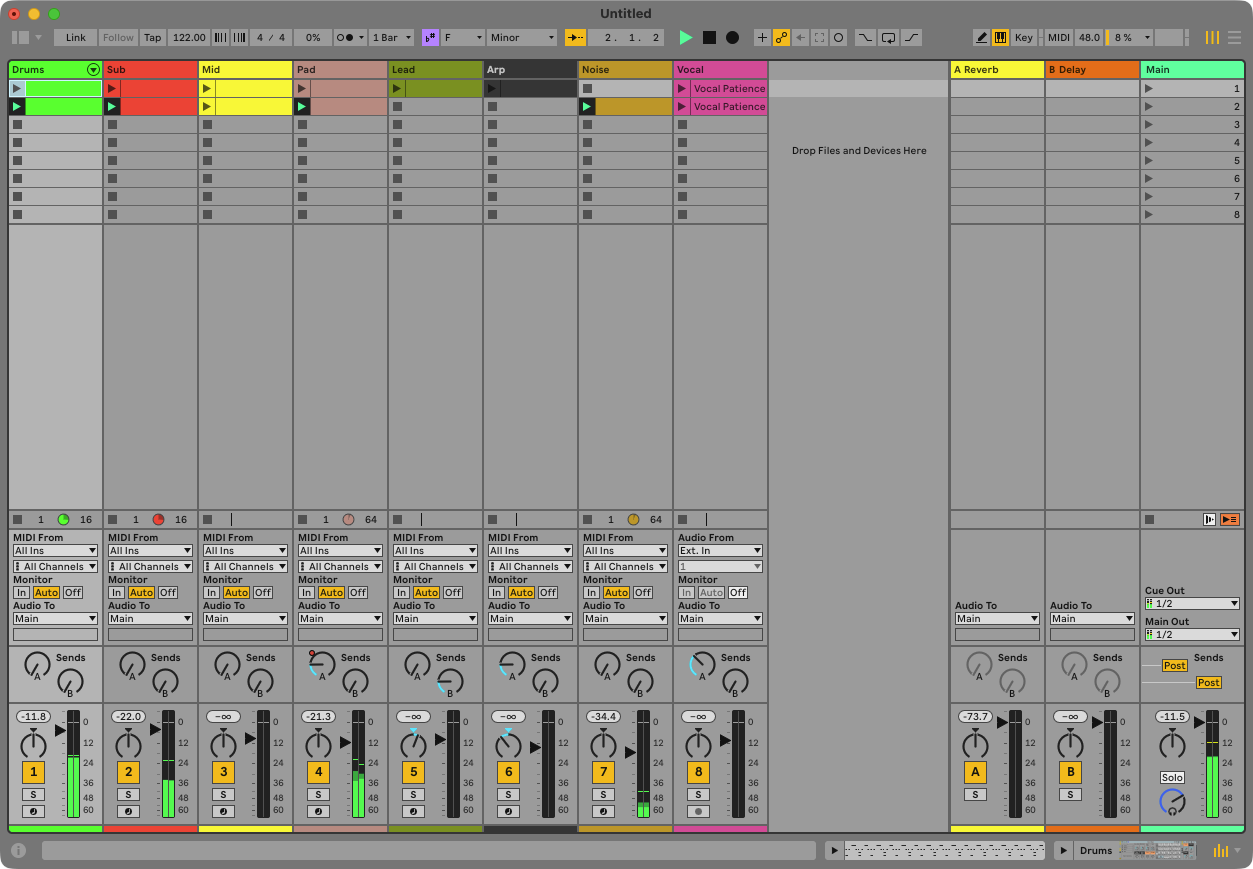
Ableton Live Mixer view after lesson 10, showing per-track volume, sends, and monitoring for every track in the Set
The Mixer after lesson 10 — levels and sends set by hand and by Claude, reacting to the fader you move.

Ten lessons

The curriculum

One lesson a session, in order, on one fresh Set — lesson 3 needs lesson 2's drums. Every row opens Path 1; the nb link is the same lesson as its executed notebook.

01

Orientation

Tempo, key, an empty Set you can read.

nb ↗
02

Drums

Kick, hats, clap, a groove — a 909 kit, 88 notes, swing by moving notes.

nb ↗
03

Bass

Sub and mid locked to the kick, the first automation.

nb ↗
04

Harmony

A four-chord progression on a pad — Fm7 Db Ab Eb — written in one undo.

nb ↗
05

Melody and arp

A plucked lead with one blue note, a 64-note arp.

nb ↗
06

Sound design

Racks, macros, sends, and the plug-in wall — what Claude cannot touch, and says so.

nb ↗
07

Movement

Filter builds, reverb throws, a riser.

nb ↗
08

Arrangement

The full 5:30 structure — 152 clips, 7 locators.

nb ↗
09

Audio

A vocal chop, warped and placed.

nb ↗
10

Mixing with a human in the room

Levels, sends, and Claude reacting to the fader you move.

nb ↗

How it works

What you need

Honesty is the angle, not hype: the course shows where Claude stops — a macro nobody but you can map, a plug-in's Configure button — as carefully as where it works.

Ableton LiveLive 12, any editionSideman is a Remote Script, not a Max for Live device — no Suite required.
AssistantClaude Code, with Sideman installedmacOS installer or pip install sideman — see the install page.
ComputerThe installer is macOSThe server itself is Python, and Live's Remote Script runs on Windows too — but this course was recorded on macOS.
For Path 2Python and Jupyter with the sideman kernelPath 2 explains the setup before its first notebook.
CostFree to read. No account.

Before you start

1

Install Sideman

The macOS installer or pip install sideman, then the one step no installer can do for you: turning it on as a Control Surface in Live's preferences. Full steps on the install page.

2

Open Live on a fresh Set

⌘N. Every lesson starts from a fresh Set, and nothing in a lesson touches a Set you didn't build in the one before.

3

Ten minutes with Start here

Three prompts that show the whole idea before you commit to ten lessons.

Questions

FAQ

Is it free?

Yes, to read.

Does it need Live Suite?

No — Sideman is a Remote Script, and works with any Live edition.

Mac only?

The installer is macOS. The server itself is Python, and Live's Remote Script works on Windows too — but the course was recorded on macOS.

Will it change my own Set?

Each lesson starts from a fresh Set. Do it on ⌘N and your existing work is untouched.

Can I run the notebooks?

Yes — Path 2 explains the kernel and how to run each one against your own Live.

Why is the source private when Sideman is open source?

The tool is GPL. The course text is the author's. The site is free to read.

Free · no account · any Live 12 edition

Ready to start?

Ten minutes with Start here shows you the whole idea before you commit to ten lessons.